

UAE Unified Number (UID): The Complete Guide — What It Is, Where to Find It, and How to Check It Online

Quick Answer
The UAE Unified Number (UID) is a permanent immigration identifier assigned by GDRFA to everyone who enters the UAE, linking your identity across visas, entry permits and residency records, and it is distinct from your Emirates ID number and visa or file number. It matters to every resident and visa applicant, since the UID is needed for Emirates ID, visa renewals and many government services. The key criterion is knowing where to find it (entry permits, visa stickers, eVisas) and how to retrieve it online via GDRFA or ICP. Main risks and exceptions include confusing the UID with other identifiers, and duplicate or missing UIDs that GDRFA or ICP must merge or locate. Practically, check your visa documents or GDRFA and ICP online services, and resolve duplicates early. Because immigration procedures can change, if your UID is missing or duplicated confirm the fix with GDRFA, ICP or a qualified advisor.
Summary (for users in a hurry)
-
Unified Number (UID) = your immigration identifier in the UAE.
-
You’ll see it on entry permits, residence visa stickers/eVisas, and you can retrieve it via GDRFA/ICP online services.
-
It is not the same as your Emirates ID number or your residence permit/visa number.
-
You’ll need your UID to apply for Emirates ID, manage visa renewal/cancellation, and use many government services.
-
If your UID is missing or duplicated, GDRFA/ICP can locate/merge it.
What is the UAE Unified Number (UID)?
The UAE Unified Number, often called the UID number, is a unique immigration identifier assigned to every individual who enters the UAE and interacts with its immigration system. Think of it as your permanent immigration profile number: it links your identity across visas, entry permits, and residency records.
Key points:
-
The UID is generated and maintained by GDRFA (General Directorate of Residency and Foreigners Affairs) and recognized across the UAE’s immigration platforms, including ICP (Federal Authority for Identity, Citizenship, Customs & Port Security).
-
A person usually receives a UID upon first entry or when an entry permit/visa is issued.
-
The UID does not expire; it’s your long-term immigration identity.
-
It is frequently required for Emirates ID applications, residence visa issuance/renewal, and various government e-services.
Why people confuse it: The UAE system uses multiple identifiers—UID, Emirates ID number, residence visa number, residence file number—each with a different purpose. This guide clarifies the differences and shows where to find each one.
UID vs Emirates ID vs Residence Visa Number vs File Number
Below is a side-by-side comparison to help you quickly understand each term and avoid mixing them up:
| Identifier | Issued By | Purpose | Where You’ll See It | Does It Change? |
|---|---|---|---|---|
| UID (Unified Number) | GDRFA (recognized by ICP) | Immigration identity linking all visa & entry records | Entry permit, residence visa sticker/eVisa, online portals | No (permanent; duplicates can be merged) |
| Emirates ID Number | ICP | National ID for residents (banking, telecom, services) | Emirates ID card & ICP account | Stays same while valid; reissued on renewal |
| Residence Visa Number | GDRFA | Identifies a specific residence visa | Residence visa (sticker/eVisa PDF) | Yes (new visa/renewal → new number) |
| Residence File Number | GDRFA/ICP | Immigration/residency file reference | Visa sticker/eVisa & portals | May change with sponsor/category |
| Labour Card Number | MOHRE | Employment identity in labour system | MOHRE app/portal | May update with job/status |
Where to Find Your UID Number (passport, visa, eVisa)
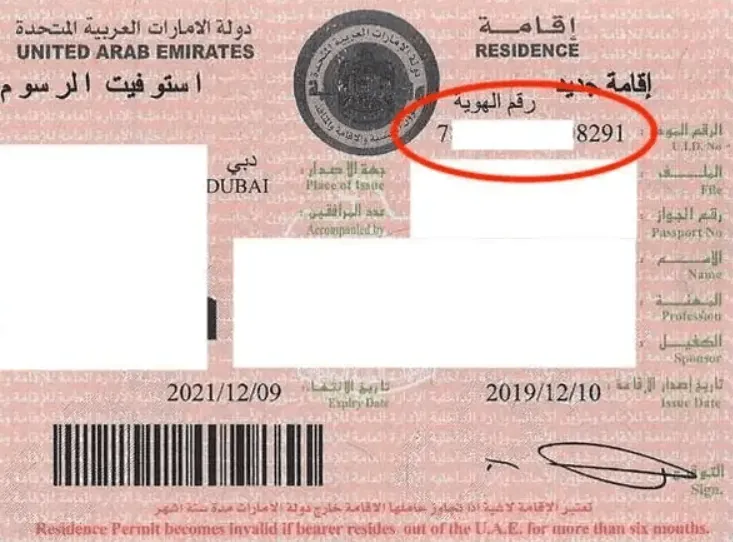
Depending on your document type and the emirate, your UID may appear in slightly different sections or labels. Look for any of the following cues:
-
Residence Visa (sticker or eVisa PDF)
-
Often labelled “Unified Number”, “UID No.”, or “Unified ID”.
-
On eVisas, it appears in the header block alongside visa and file details.
-
-
Entry Permit / Entry Visa
-
If you are entering for employment, investment, family sponsorship, or study, the entry permit document generally shows the UID.
-
-
Passport Page with UAE Visa
-
If you have a physical sticker, scan the printed fields. Some formats list “UID” explicitly; others place it near file number.
-
-
Online Portals
-
GDRFA and ICP can display your UID after you enter passport details and personal information.
-
Pro tips:
-
Don’t confuse UID with the Emirates ID number printed on your card. They serve different systems (immigration vs national identity).
-
If your visa shows “Unified Number” and a sequence of digits—that’s your UID number.
-
Format: There is no single universal length/format across all years and categories; formats can vary. Focus on the label rather than guessing by pattern.
How to Check Your UID Number Online (GDRFA, ICP, Amer)
There are multiple legitimate ways to retrieve or verify your UID number:
Option 1 — GDRFA Dubai (web)
Step 1 — Open the official website
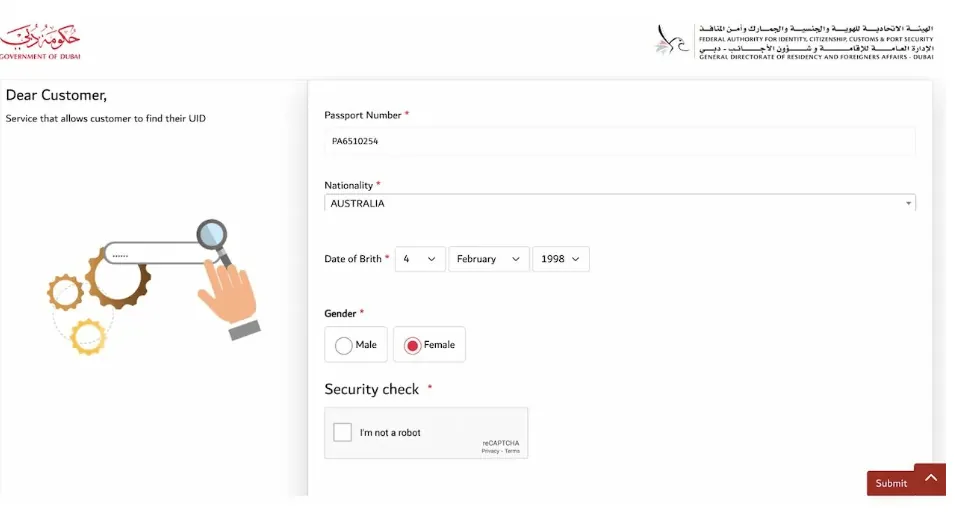
Go to the GDRFA Dubai website and open the Unified Number / File Validity inquiry page (names can vary: Unified Number Inquiry, File Validity, Entry Permit Inquiry). If you don’t see it in the menu, use the site search for “Unified Number” or “UID”.
Step 2 — Enter your details
Fill in the required fields exactly as in your passport:
-
Passport Number (no spaces)
-
Nationality (from the dropdown)
-
Date of Birth (use the site’s date format)
-
Gender (shown on some forms)
Step 3 — Complete the verification
Solve the simple security check (captcha/math question) and confirm any on-screen terms.
Step 4 — Submit the request
Click Submit to run the query.
Step 5 — View your result
If a match is found, the page will display your Unified Number (UID) and related immigration file details.
If no record appears:
-
Recheck the passport number, DOB format, and nationality selection.
-
Try again without extra spaces or symbols.
-
If the portal still shows “no records found,” visit an Amer Centre or use the ICP Smart Services portal to cross-check.
Option 2 — ICP Smart Services (all Emirates)
-
Go to ICP Smart Services (smart services portal).
-
Use the File Validity or Visa/Residency inquiry tool.
-
Provide passport, nationality, and DOB.
-
The portal displays your UID along with visa status when records match.
Option 3 — Amer Centres (Dubai)
-
Visit any Amer Centre with your passport and visa copy.
-
Request a UID lookup or file validity check at the counter.
Heads-up: Portal labels and menu names can change over time; if one path isn’t visible, use the portal’s search bar for “file validity”, “unified number inquiry service”, or “UID”.
How to Get a UID Number (first time, lost UID, duplicates)
First-time issuance
You don’t apply separately for a UID. It is generated automatically when an entry permit or visa is issued, or upon first entry through UAE immigration. This applies to employees, investors, dependents, students, and even tourists.
If you “lost” your UID
-
Retrieve it using GDRFA or ICP online tools (see previous section).
-
If the portal can’t find it, visit Amer (Dubai) or an ICP service centre with your passport.
Duplicate UIDs (rare but critical)
-
Sometimes people end up with two UIDs (e.g., multiple entries under different statuses or older system migrations).
-
Duplicates can cause trouble when applying for Emirates ID, residence renewals, or labour contracts.
-
Solution: Ask GDRFA/ICP to merge UIDs so that all records map to one unified profile.
How the UID relates to Labour Card (MOHRE)
Many users search for “how to check labour card online” or “how to get labour card number online” while dealing with UID:
-
The labour card (now largely digital via MOHRE app/portal) is your employment identifier in the labour system.
-
Your UID is often referenced in cross-checks between immigration (GDRFA/ICP) and labour (MOHRE) records.
-
To check your labour card details:
-
Install/open the official MOHRE app or visit the MOHRE e-services site.
-
Sign in (or use UAE Pass).
-
Use “My Contracts” / “Labour Card” sections to retrieve your profile.
-
-
While you can’t derive a UID solely from MOHRE, consistent identity data (passport, Emirates ID) helps systems match you correctly.
Common Use Cases & When You’ll Need UID
-
Applying for Emirates ID (EID): UID is a required field during EID registration/renewal.
-
Residence visa issuance/renewal/cancellation: Immigration services reference UID to ensure your file is consistent.
-
Changing sponsor or job: Authorities link your immigration profile via UID.
-
Government e-services: Housing, licensing, and health services may ask for UID in online forms.
-
Correcting immigration records: If there’s any mismatch in your identity data, officers will use the UID to trace your file.
Troubleshooting & Edge Cases
“My visa shows no UID field”
Some print layouts or PDFs hide it behind different labels (e.g., Unified Number, UID No., or nested in file details). Run a GDRFA/ICP search with passport data.
“My UID and Emirates ID don’t match records”
That’s normal—they’re different systems. If your Emirates ID application fails due to record mismatch, visit ICP with your documents; they can reconcile data referencing your UID.
“Two UIDs found under my name”
Request a UID merge at GDRFA/ICP. Bring passport, any old entry permits, and residence visa copies.
“I changed my passport—will my UID change?”
No. UID stays the same. Update your passport details with GDRFA/ICP/MOHRE so all systems reflect your new passport number.
“Tourist with UID—does it matter?”
Yes. Tourists receive a UID too. If you later switch to employment or investor residence, that UID helps link your record.
Examples & Practical Tips
Practical tips to avoid confusion
-
Screenshot your eVisa and entry permit and keep a digital copy. Use your system search for “Unified Number” or “UID”.
-
In forms, don’t paste your Emirates ID number where UID is requested. They’re different.
-
When contacting support (GDRFA/ICP/Amer), have ready: passport, entry permit/eVisa, residence visa copy, and Emirates ID (if any).
Example labels you might see (textual mock-ups)
-
Unified Number / UID No.:
1234567890 -
File No.:
201/XXXXXXX/XXXXXX -
Residence Visa No.:
XXXXXXXXX -
Emirates ID No.:
784-XXXX-XXXXXXX-X
Note: These are anonymized examples. Actual lengths and formats can vary by year, emirate, and document type.
FAQ: UAE UID / Unified Number
Below is an expanded FAQ designed to capture long-tail searches and People-Also-Ask (PAA) style queries while remaining user-friendly.
Glossary of Immigration Identifiers
-
UID / Unified Number / Unified Identification Number: Permanent immigration identifier.
-
Emirates ID Number: National identity number for residents, printed on the Emirates ID card.
-
Residence Visa Number / Residence Permit Number: Identifies a specific residence visa.
-
Residence File Number: Immigration file reference associated with your case.
-
MOHRE Labour Card Number: Employment identity in the labour system (separate from immigration).
Final Thoughts + Professional Help
Your UAE Unified Number (UID) is the backbone of your immigration identity. You’ll need it when applying for Emirates ID, renewing your residence visa, changing employers, or using many public e-services. If your UID is missing, if you can’t retrieve it online, or if you suspect duplicates, resolve it early—otherwise routine applications can stall.
Need help?
Inlex & Partners assists individuals and companies across the UAE with:
-
UID lookups and corrections (including duplicate merges).
-
Residence visa applications, renewals, cancellations.
-
Emirates ID applications and updates.
-
MOHRE (labour) procedures and employer changes.
Get in touch to streamline your immigration journey.
Phone/WhatsApp: +971 52 564 6001
Email: office@inlex-partners.com
About the Author


